Annotations
|
How to: |
An annotation is text, a marker, or both that you can place anywhere on a chart. Multiple annotations can be defined within the annotations array.
The following shows the properties and default values for annotations:
annotations: [
 position: {
   x: undefined,
   y: undefined,
   parent: 'background'
        },
 marker: {
   visible: true,
   color: 'red',
   size: 8,
   shape: 'circle',
   rotation: 0,
   border: {
     width: 1,
     color: 'black',
     dash: ''
           }
        },
 label: {
    visible: false,
    text: 'Annotation Label',
    font: '10pt Sans-Serif',
    color: 'black',
    position: 'center'
     }
 },
]
Syntax: How to Place an Annotation on a Chart
annotations: [
 position: {
   x: x,   y: y,
   parent: 'string'
     },
 marker: {
   visible: boolean,
   color: 'string',
   size: number,
   shape: 'string',
   position: 'string',
   rotation: number,
   border: {
     width: number,
     color: 'string',
     dash: 'string'
         }
     },
 label: {
         visible: boolean,
         text: 'string',
         font: 'string',
         color: 'string',
         position: 'string'
     }
 },
   .
   .
   .
]
where:
- position:
- Defines the position of the annotation marker.
- x: x
-
Is the horizontal position for the annotation marker. Can be:
- A number. If the parent chart component is 'chart', the number represents a value on a numeric axis. Otherwise, it represents a number of pixels from the lower left corner of the parent component.
- A series and group label for a horizontal chart (in the form {series:n,group:m}), which places the annotation on that series or group. This requires the parent component to be 'chart'.
- A percent string (for example, ‘40%'), which places the annotation at a point the specified percentage horizontally from the lower left corner of the parent component.
- A pixel string (for example, '40px'), which places the annotation at a point that number of pixels horizontally from the lower left corner of the parent component.
- y: y
-
Is the vertical position for the annotation marker. Can be:
- A number. If the parent chart component is 'chart', the number represents a value on a numeric axis. Otherwise, it represents a number of pixels from the lower left corner of the parent component.
- A series and group label for a vertical chart (in the form {series:n,group:m}), which places the annotation on that series or group. This requires the parent component to be 'chart'.
- A percent string (for example, ‘40%'), which places the annotation at a point the specified percentage vertically from the lower left corner of the parent component.
- A pixel string (for example, '40px'), which places the annotation at a point that number of pixels vertically from the lower left corner of the parent component.
- parent: 'string'
-
Can be one of the following chart components:
- 'background', which measures the position from the lower left corner of the chart frame and places the annotation behind the chart. This is the default value.
- 'chart', which measures the position from the lower left corner of the chart draw area and places the annotation on the chart.
- 'legend', which measures the position from the lower left corner of the legend area and places the annotation in the legend area.
- marker:
- Defines the properties of the annotation marker.
- visible: boolean
-
Defines whether the annotation marker is visible. Valid values are:
- true, which makes the annotation marker visible. This is the default value.
- false, which makes the annotation marker not visible.
- color: 'string'
-
Defines the color for the annotation marker, defined by a color name or numeric specification string, or a gradient defined by a string. The default value is 'red'.
- size: number
-
Is the size, in pixels, of the annotation marker. The default value is 8.
- shape: 'string'
-
Is a shape for the annotation marker. All valid marker shapes are supported. The default shape is 'circle'.
For a list of marker shapes, see Series-Specific Properties.
- position: 'string'
-
Defines the marker position relative to data text labels for bullet charts as 'top', 'bottom', or 'middle', Not supported for other types of charts.
- rotation: number
-
Is a number between 0 and 360 that defines the rotation angle of the marker, in degrees.
- border:
- Defines the properties of the marker border.
- width: number
-
Is a number that defines the width of the border in pixels. The default value is 1.
- color: 'string'
-
Is a color for the marker border defined by a color name or numeric specification string. The default value is 'black'.
- dash: 'string'
-
Is a string that defines the border dash style. Use a string of numbers that defines the width of a dash followed by the width of the gap between dashes. The default is no dash ('').
- label:
- Defines the properties of the annotation label.
- visible: boolean
-
Defines whether the annotation label is visible. Valid values are:
- true, which makes the annotation label visible. This is the default value.
- false, which makes the annotation label not visible.
- text: 'string'
-
Defines the annotation label text. The default value is no label text.
- font: 'string'
-
Defines the annotation label font. The default value is '10pt Sans-Serif'.
- color: 'string'
- Defines the annotation label color defined by a color name or numeric specification string. The default value is 'black'.
- position: 'string'
-
Defines a position for the annotation label relative to the annotation marker. Valid values are:
- 'top', which places the annotation label above the annotation marker.
- 'bottom', which places the annotation label below the annotation marker.
- 'left', which places the annotation label to the left of the annotation marker.
- 'right', which places the annotation label to the right of the annotation marker.
- 'center', which places the annotation label centered on the annotation marker. This is the default value.
Example: Adding Annotations
The following request specifies two annotations. The first annotation is on the chart component. Its marker is a yellow pirate cross with a black border that is 120 pixels horizontally from the left edge of the x-axis and at the 800K point along the y-axis (which is numeric). The label is positioned below the marker. The second annotation only has a position (representing pixels), so there is no label, and it has the default marker, a red circle that is 8 pixels in size.
GRAPH FILE WF_RETAIL_LITE
SUM COGS_US GROSS_PROFIT_US
BY PRODUCT_CATEGORY
ON GRAPH PCHOLD FORMAT JSCHART
ON GRAPH SET LOOKGRAPH VBAR
ON GRAPH SET STYLE *
*GRAPH_JS
annotations : [
    {
     position: {
       x: '120px',
       y: 800000,
       parent: 'chart'
       },
     marker: {
       visible: true,
       color: 'yellow',
       size: 30,
       shape: 'piratecross',
       rotation: 0,
       border: {
         width: 1,
         color: 'black',
         dash: ''
           }
       },
    label: {
       visible: true,
           text: 'Chart annotation: x: 120px, y: 800K',
           font: '14pt Times New Roman',
           color: 'black',
           position: 'bottom'
       }
   },
   {
   position: {
     x: 10,
     y: 200
       }
   },
  ]
*END
ENDSTYLE
END
The output is:

Example: Placing Annotations Relative to a Series and Group
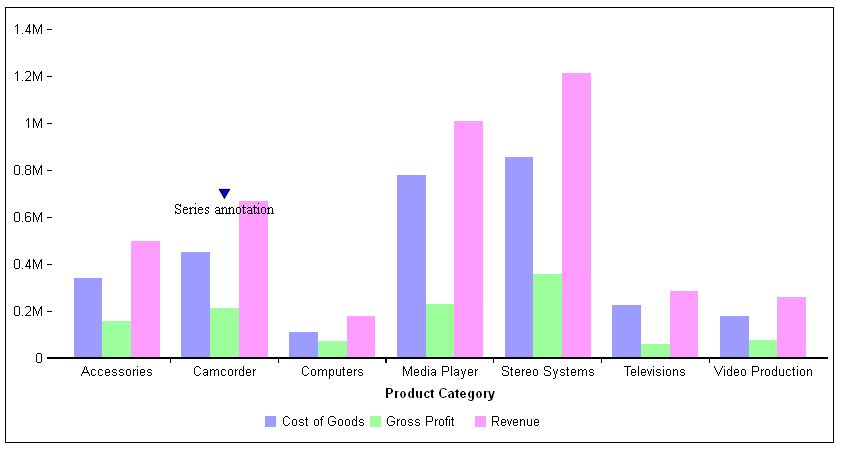
The following request has one annotation, on series 1 and group 1. The y value is at 50% along the y-axis. The marker is a blue triangle.
GRAPH FILE WF_RETAIL_LITE
SUM COGS_US GROSS_PROFIT_US REVENUE_US
BY PRODUCT_CATEGORY
ON GRAPH PCHOLD FORMAT JSCHART
ON GRAPH SET LOOKGRAPH VBAR
ON GRAPH SET STYLE *
*GRAPH_JS
annotations : [
    {
     position: {
       x: {series:1, group:1},
       y: '50%',
       parent: 'chart'
       },
     marker: {
       visible: true,
       color:'blue',
       shape: 'triangle',
       rotation: 0,
       border: {
          width: 1,
          color: 'black',
          dash: ''
           }
       },
     label: {
       visible: true,
       text: 'Series annotation',
       font: '10pt Times New Roman',
       color: 'black',
       position: 'bottom'
       }
   },
  ]
*END
ENDSTYLE
END
The output is:
Example: Placing an Annotation in the Legend Area
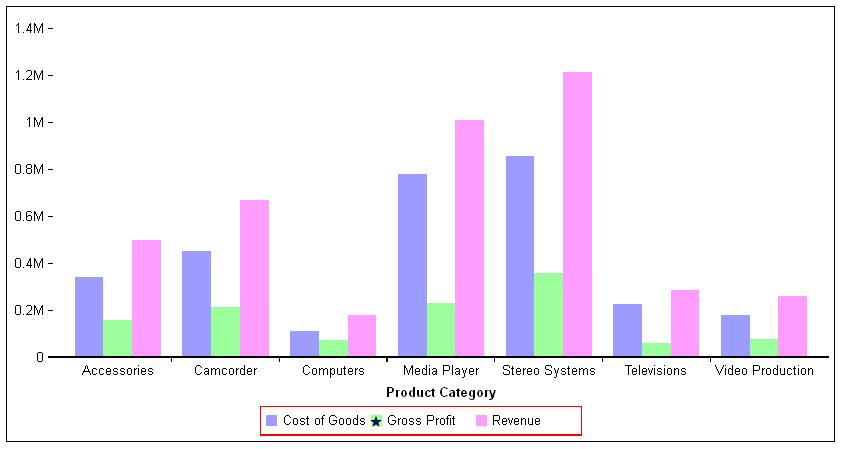
The following request places a blue star over the green legend marker in the legend area.
GRAPH FILE WF_RETAIL_LITE
SUM COGS_US GROSS_PROFIT_US REVENUE_US
BY PRODUCT_CATEGORY
ON GRAPH PCHOLD FORMAT JSCHART
ON GRAPH SET LOOKGRAPH VBAR
ON GRAPH SET STYLE *
*GRAPH_JS
legend: {lineStyle:{color:'red'}},
annotations : [
    {
     position: {
       x: '106px',
       y: '.14px',
       parent: 'legend'
       },
     marker: {
       visible: true,
       color:'blue',
       shape: 'fiveStar',
       rotation: 0,
       border: {
         width: 1,
         color: 'black',
         dash: ''
           }}
       },

  ]
*END
ENDSTYLE
END
The output is:
| WebFOCUS | |
|
Feedback |