Deleting a Slice From a Pie Chart
|
How to: |
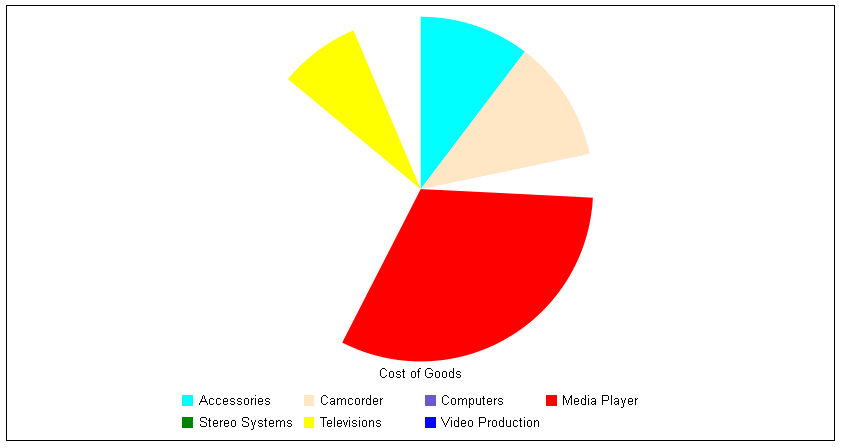
The deleteSlice property deletes a slice from a pie chart (effectively, assigns the slice a transparent color).
Syntax: How to Delete a Slice From a Pie Chart
series:
[
    {
      series: number,
      group: number,
      deleteSlice: boolean,
   }
]
where:
- series: number
-
Is a zero-based series number or 'all' to delete all slices. If the series does not exist in the chart, the property is ignored.
- group: number
-
For multi-pie charts, is an optional zero-based group (pie) number. If the group does not exist in the chart, the property is ignored. If a group number is not specified, the slice is deleted from all pies.
- deleteSlice: boolean
-
Can be:
- true, to delete the slice.
- false, to restore the slice. This is the default value.
Example: Deleting Pie Slices
The following request generates a pie chart, but deletes the slices for series 2, 4, and 6:
GRAPH FILE WF_RETAIL_LITE
SUM COGS_US
ACROSS PRODUCT_CATEGORY
ON GRAPH PCHOLD FORMAT JSCHART
ON GRAPH SET LOOKGRAPH PIE
ON GRAPH SET STYLE *
*GRAPH_JS
series: [
   {series: 0, color: 'cyan'},
   {series: 1, color: 'bisque'},
   {series: 2, color: 'slateblue', deleteSlice: true},
   {series: 3, color: 'red'},
   {series: 4, color: 'green', deleteSlice: true},
   {series: 5, color: 'yellow'},
   {series: 6, color: 'blue', deleteSlice: true}
 ]
*END
ENDSTYLE
END
The output is;
| WebFOCUS | |
|
Feedback |