Defining the Minimum and Maximum Values on a Numeric Axis
|
How to: |
On a numeric axis, the min and max properties define the minimum and maximum values to draw on the axis.
Syntax: How to Define the Minimum and Maximum Values for a Numeric Axis
axisname: {
  min: number,
  max: number}
where:
- axisname
-
Can be:
- xaxis
- yaxis
- y2axis
- min: number
-
Is the minimum value to draw on a numeric axis. The default value is undefined, which automatically calculates the minimum value based on values in the data set.
- max: number
-
Is the maximum value to draw on a numeric axis. The default value is undefined, which automatically calculates the maximum value based on values in the data set.
Example: Specifying the Minimum and Maximum Values to Display on a Numeric Axis
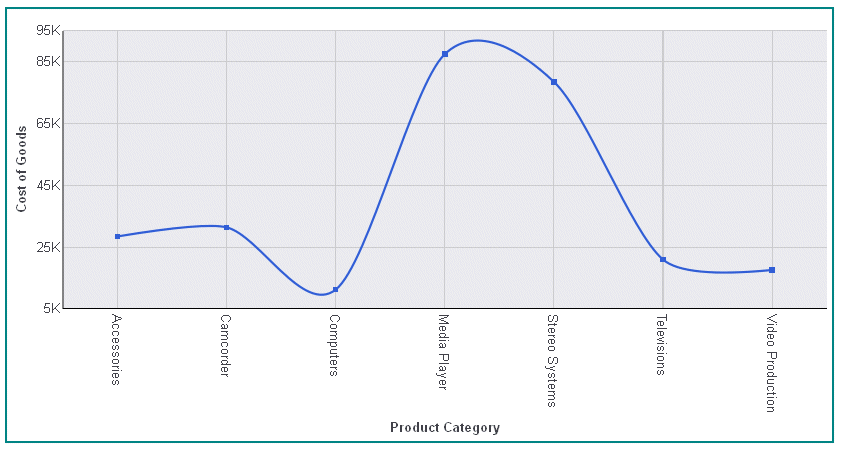
The following request generates a vertical line chart and makes the minimum value shown on the y-axis 5,000, and the maximum value 95,000:
GRAPH FILE WF_RETAIL_LITE
SUM COGS_US
ACROSS PRODUCT_CATEGORY
ON GRAPH PCHOLD FORMAT JSCHART
ON GRAPH SET LOOKGRAPH LINE
ON GRAPH SET STYLE *
INCLUDE=IBFS:/FILE/IBI_HTML_DIR/javaassist/intl/EN/ENIADefault_combine.sty,$
*GRAPH_JS
border: {width: 2, color: 'teal'},
blaProperties: {lineConnection: 'curved'},
yaxis: {
  min: 5000,
  max: 95000
  }
*END
ENDSTYLE
END
The output is:
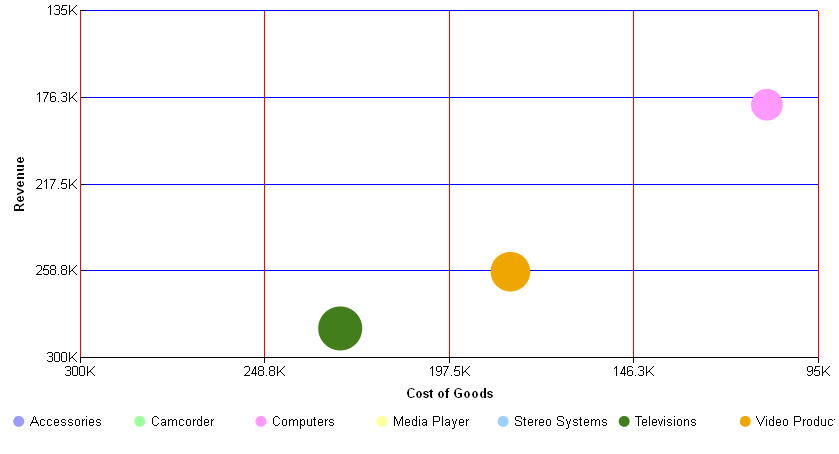
The following request generates a bubble chart and sets the maximum and minimum values to draw on each axis:
GRAPH FILE WF_RETAIL_LITE
SUM COGS_US REVENUE_US DISCOUNT_US
BY PRODUCT_CATEGORY
ON GRAPH PCHOLD FORMAT JSCHART
ON GRAPH SET LOOKGRAPH BUBBLE
ON GRAPH SET STYLE *
*GRAPH_JS
border: {width:0},
series: [{series: 'all', marker: {shape: 'circle'}}],
yaxis: {
  min: 300000,
  max: 135000,
  majorGrid: {lineStyle: {width: 1, color: 'blue'}},
  },
xaxis: {
  min: 300000,
  max: 95000,
  majorGrid: {lineStyle: {width: 1, color: 'red'}},
  }
*END
ENDSTYLE
END
The output is:
| WebFOCUS | |
|
Feedback |