Simple Data Flow at a Glance
|
Reference: |
You can use DataMigrator to build data flows ranging from the simple, where data is moved from one source into one target, to the complex, which employs multiple sources and targets and a variety of data extraction techniques.
This simple data flow consists of a data source, an SQL object, and a data target, as shown in the following image.
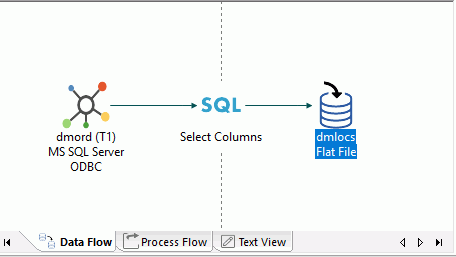
To create a simple data flow:
- Open a new
flow.
The Data Flow tab opens by default, with an SQL object in the center of the workspace.
- To add a data source object, drag a data source object from the list of synonyms in the navigation pane into the workspace, to the left of the SQL object.
- Select the
columns that you want to extract from the source and copy into the target.
Note: If Automatically select all columns is selected in the Data Flow Designer user preferences tree from the Options dialog box, you do not need to manually select columns.
- To add a data target object to the data flow, right-click the workspace to the right of the SQL object, select Add Target, and then click New.
- Save and submit
the data flow.
Note: Flow names can be up to 64 characters.
- View the log file for data flow details.
Reference: Data Flow Objects in the Workspace
Data flow objects appear as follows in the workspace:
|
Object |
Function |
|---|---|
|
|
Data source - sourcename (Tn) or appdir/sourcename (Tn) Indicates a data source for the data flow, where sourcename is the name of the synonym and Tn is the table number. A key icon in this object indicates that the synonym has a key identified. |
|
|
SQL/Select Columns Contains the generated SQL used to extract the data, based on selected columns, filters, and sorts used in the data flow. A filter, or sort, icon in this object indicates when a filter or sort has been specified. |
|
|
Target - targetname or appdir/targetname Indicates a target for the data flow, where targetname is the name of the synonym. A key icon indicates if the target table has key columns identified. A red star on the icon indicates a new target table. |


| WebFOCUS | |
|
Feedback |