Defining a Border for Series Risers
|
How to: |
The border properties define a border for all risers, for all risers in an individual series, or for an individual riser identified by a series and group number. It can be used for area risers, bar risers, funnel segments, gauge needles, and pie slices.
Syntax: How to Define a Border for Series Risers
"series": [
   {
      "series": number,
      "group": number, // optional
      "border": {
         "width": number,
         "color": "string",
         "dash": "string"
      },
   }
]
where:
- "series": number
-
Is a zero-based series number. If the series does not exist in the chart, the property is ignored.
- "group": number
-
Is an optional zero-based group number. If the group does not exist in the chart, the property is ignored. If a group number is not specified, the border is applied to all risers in the series.
- "border":
- Defines the properties of the riser border.
- "width": number
-
Is a number that defines the width of the border in pixels.
- "color": "string"
-
Is a color defined by a color name or numeric specification string.
For information about defining colors, see Colors and Gradients.
- "dash": "string"
-
Is a string that defines the border dash style. Use a string of numbers that defines the width of a dash in pixels followed by the width of the gap between dashes in pixels.
Example: Defining Borders for Series Risers
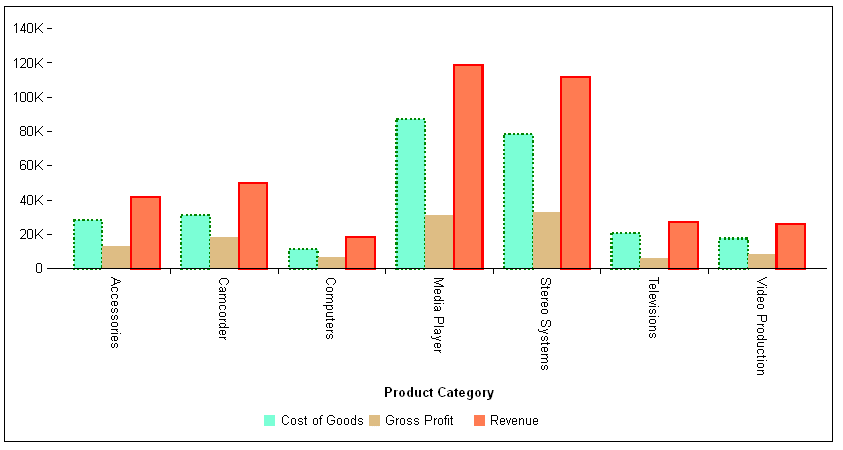
The following request generates a bar chart with three series. The risers for series 0 have a green dashed border, and the risers for series 2 have a red solid border:
GRAPH FILE WF_RETAIL_LITE
SUM COGS_US GROSS_PROFIT_US REVENUE_US
ACROSS PRODUCT_CATEGORY
ON GRAPH PCHOLD FORMAT JSCHART
ON GRAPH SET LOOKGRAPH VBAR
ON GRAPH SET STYLE *
*GRAPH_JS
"series": [
	{"series": 0, "color": "aquamarine", "border": {
		"width": 2, "color": "green", "dash": "2 2"}},
	{"series": 1, "color": "burlywood"},
	{"series": 2, "color": "coral", "border": {
		"width": 2, "color": "red"}}
	]
*END
ENDSTYLE
END
The output is:
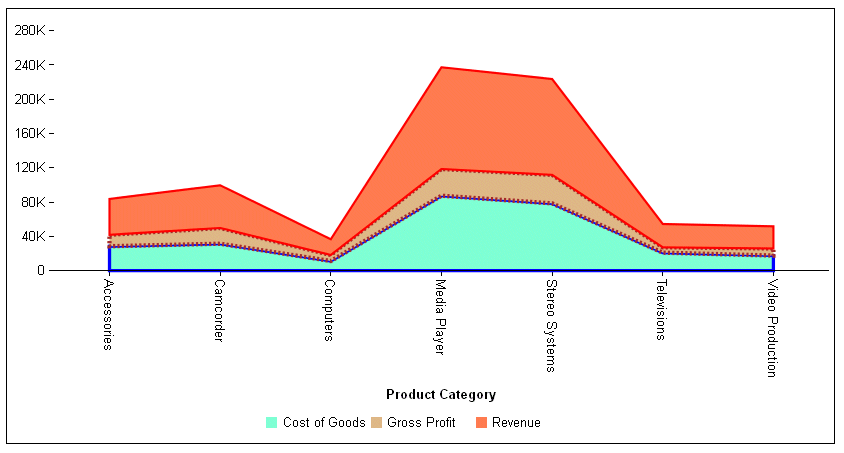
The following request generates a stacked area chart. The riser for series 0 has a blue solid border, the riser for series 1 has a brown dashed border, and the riser for series 2 has a red solid border:
GRAPH FILE WF_RETAIL_LITE
SUM COGS_US GROSS_PROFIT_US REVENUE_US
ACROSS PRODUCT_CATEGORY
ON GRAPH PCHOLD FORMAT JSCHART
ON GRAPH SET LOOKGRAPH VAREASTK
ON GRAPH SET STYLE *
*GRAPH_JS
"series": [
	{"series": 0, "color": "aquamarine", "border": {
		"width": 3, "color": "blue"}},
	{"series": 1, "color": "burlywood", "border": {
		"width": 4, "color": "brown", "dash": "2 2"}},
	{"series": 2, "color": "coral", "border": {
		"width": 2,"color": "red"}}
	]
*END
ENDSTYLE
END
The output is:
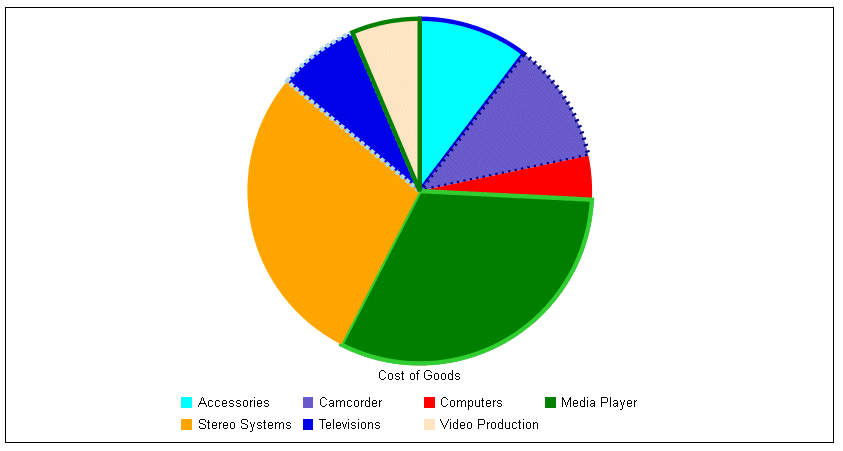
The following request generates a pie chart and defines borders for some of the slices:
GRAPH FILE WF_RETAIL_LITE
SUM COGS_US
ACROSS PRODUCT_CATEGORY
ON GRAPH PCHOLD FORMAT JSCHART
ON GRAPH SET LOOKGRAPH PIE
ON GRAPH SET STYLE *
*GRAPH_JS
"series": [
	{"series": 0, "color": "cyan", "border": {
		"width": 4, "color": "blue"}},
	{"series": 1, "color": "slateblue", "border": {
		"width": 4, "color": "navy", "dash": "2 4"}},
	{"series": 2, "color": "red"},
	{"series": 3, "color": "green", "border": {
		"width": 4, "color": "limegreen"}},
	{"series": 4, "color": "orange"},
	{"series": 5, "color": "blue", "border": {
		"width": 4, "color": "lightblue", "dash": "4 2"}},
	{"series": 6, "color": "bisque","border": {
		"width": 4, "color": "green"}}
	]
*END
ENDSTYLE
END
The output is:
| WebFOCUS | |
|
Feedback |